


Info for venues
The Great British Pub Quiz is the easiest way to turn a quiet evening into your busiest night of the week. Here's everything you need to know:
The Basics
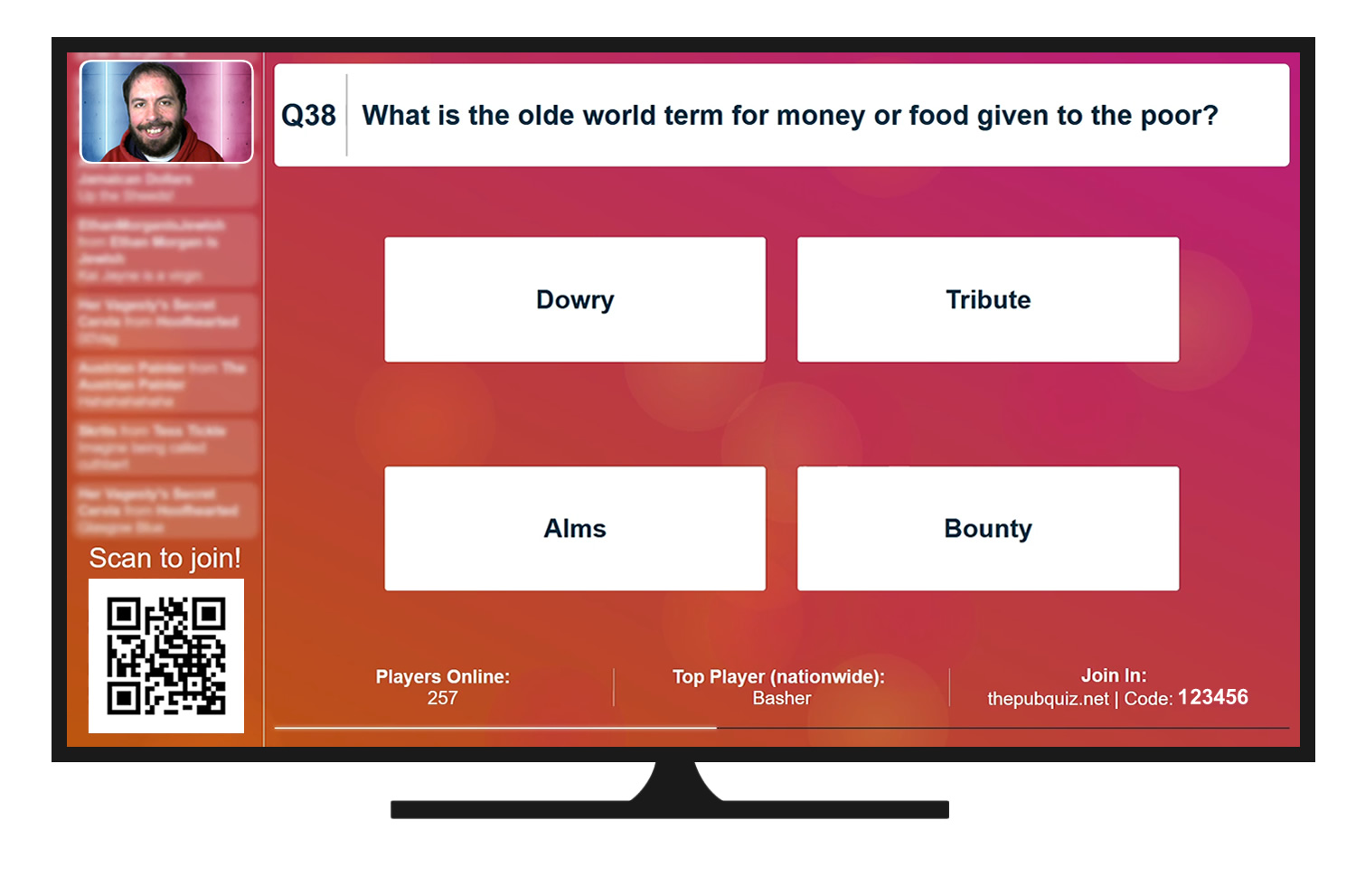
The Great British Pub Quiz is a live, interactive quiz that you can set up and run with a single click. Our live quiz master will be broadcast into your venue over the TVs, while players scan a QR code to play along using their mobile phone.
To run the quiz, all you need is a way of getting a webpage on your TVs. For most pubs, they'll use a laptop, but you can also cast from your phone/tablet, or use a smart TV.
Register
First things first, if you haven't already, please contact the good folks at Innstay to register your pub for the quiz
Open the livestream webpage on your laptop
You can either a) visit https://thepubquiz.net/tv and log into your account, or use the special link we'll provide you with to skip the log in phase altogether.
Connect your device to your TVs
If you're using a laptop, all you have to do is connect an HDMI to your laptop, and plug the other end either directly into a TV, or into your HDMI matrix (where set top boxes etc connect).
Handy tip: Make sure your device is plugged in to the mains - you don't want it dying mid-quiz!
From there all you have to do is click "Join" on the quiz page, and the browser will automatically go full screen. If you can hear the music and see the picture, you're good to go.
Making sure everything's working
We've put together a test page you can use to test your setup at any time at https://www.warppoint.net/avtest/tv. Clicking the "Join" button will put the page into full screen, and start the background music playing on an endless loop. So long as you can hear the music through your sound system (or TV, depending on your setup) and can see the picture on your big screens, you're good to go!
Troubleshooting
Laptops are usually pretty good at getting this right automatically, but just in case you experience any issues, there's a few things to check.
Video
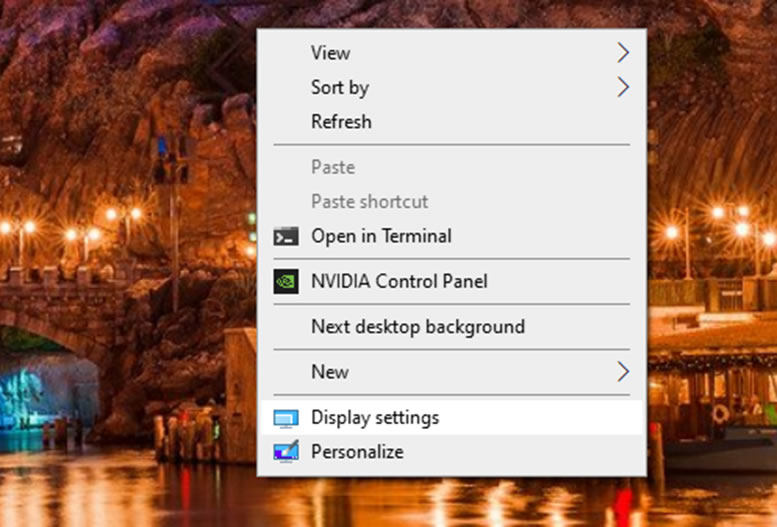
Assuming you're using Windows, right click on your desktop, and choose Display Settings
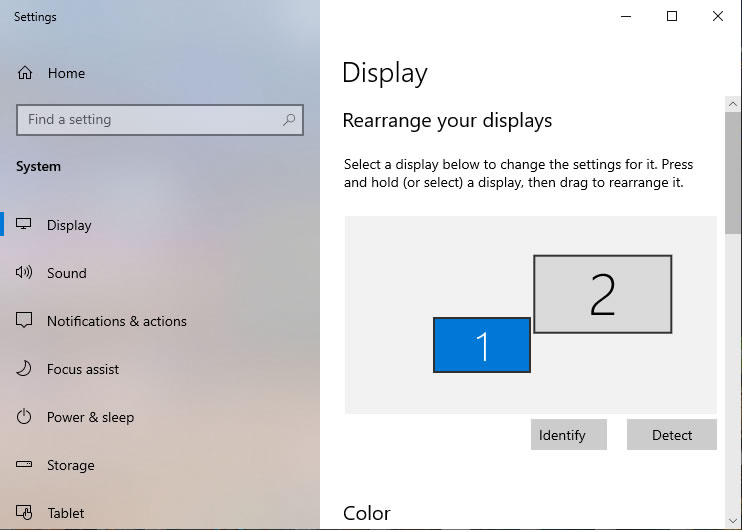
This pulls up the Display Settings window. In Windows 10, you'll need to scroll down until you find the section labelled Multiple Displays, and set this to "Extend this display".
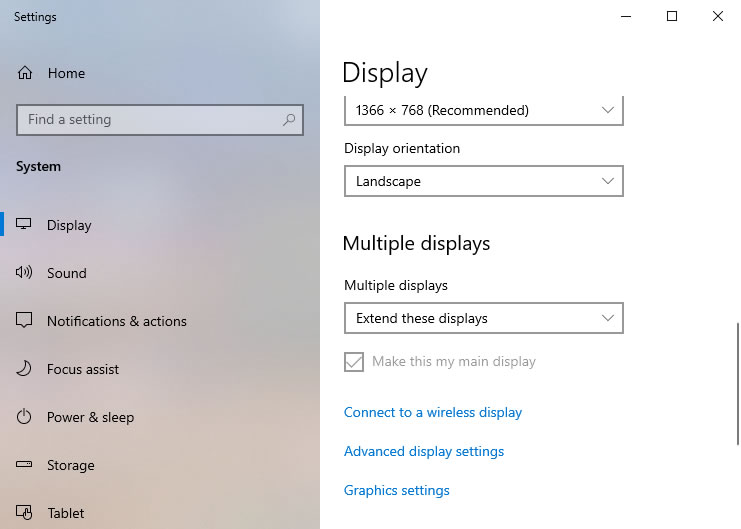
In Windows 11, it's in a slightly different place, but you still want to set it to "Extend this display".
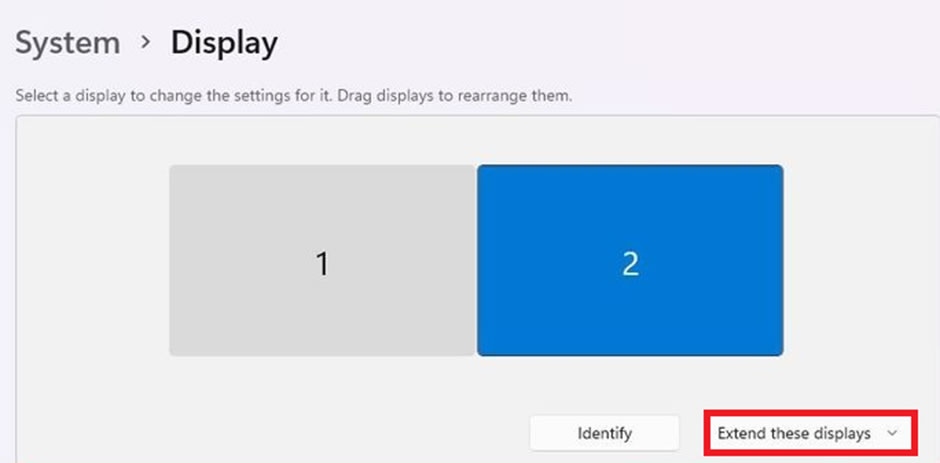
You can now drag your browser window off the right to get it on the TV.
Sound
If you can't hear any sound, you may need to adjust the output device. How you do this is a little bit different depending on which version of Windows you're using.
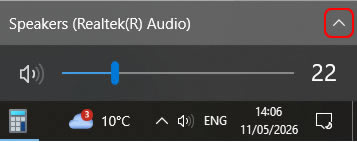
On Windows 10, click the little speaker icon that should be in the "system tray" at the bottom right of your taskbar (highlighted in red, below). If you can't see it, you may need to check in the overflow by clicking the up arrow as shown below on the far left.

In the pop up window that appears, click on the arrow in the top right to view all the potential output devices. Unfortunately, there's no easy way to tell which output is the HDMI - it may have the same name as your TV or HDMI matrix, or it may just be called something like "HDMI Out". If in doubt, try them all - if you have the test page open, you'll know you've got it right when you can hear the music!
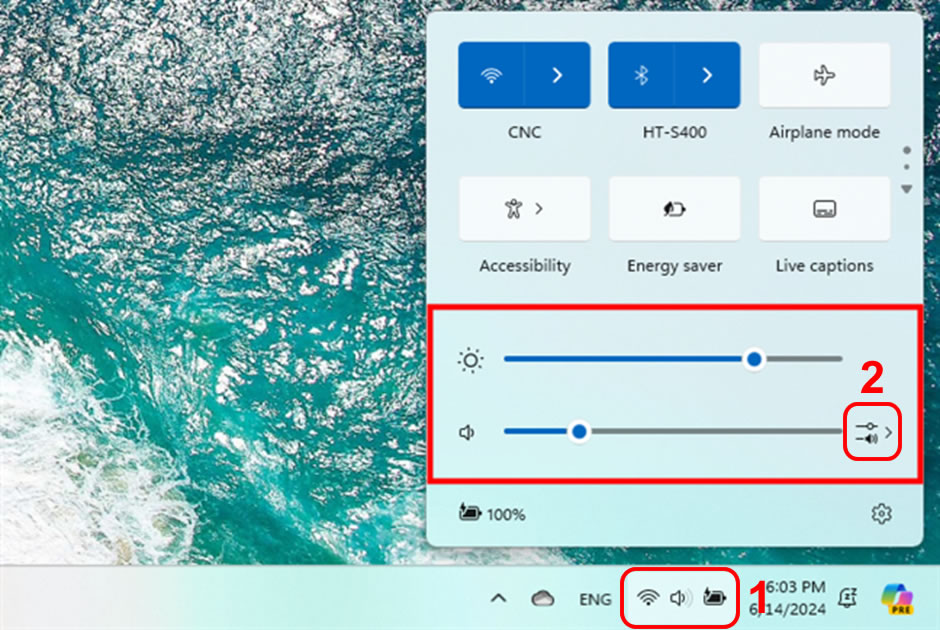
On Windows 11, click the "Quick Settings" button in bottom right (labelled 1 below), and then click the button to the right of the volume bar (labelled 2 below), which will let you choose the device to output to. As on Windows 10, you may have to try a few until you find the right one, as the names aren't always obvious.
Prizes
Prize for the quiz can be split into two parts - the cash prizes/jackpot, which we provide, and the house prizes, which we ask the pub to provide.
The current prizing is as follows:
- The top player nationwide will win a cash prize (provided by us).
- The top team in each pub will win the house prize (provided by the pub).
- And at the end of the quiz, six teams chosen at random nationwide will have the chance to play for a share of the national prize pot (provided by us)
Pubs are free to choose what they'd like to offer as the house prize - a voucher, a round of free drinks, a bar tab - whatever makes the most sense for you.
How are prizes handled?
All prizes are handled through our prizing system, meaning there's next to no admin required on your side. For the cash prize and jackpot, we handle the entire fulfilment process. Jackpots are paid directly into the prize winner's bank account. For the house prize, winners will receive an email they'll need to show to your bar staff. Here's what the process looks like:
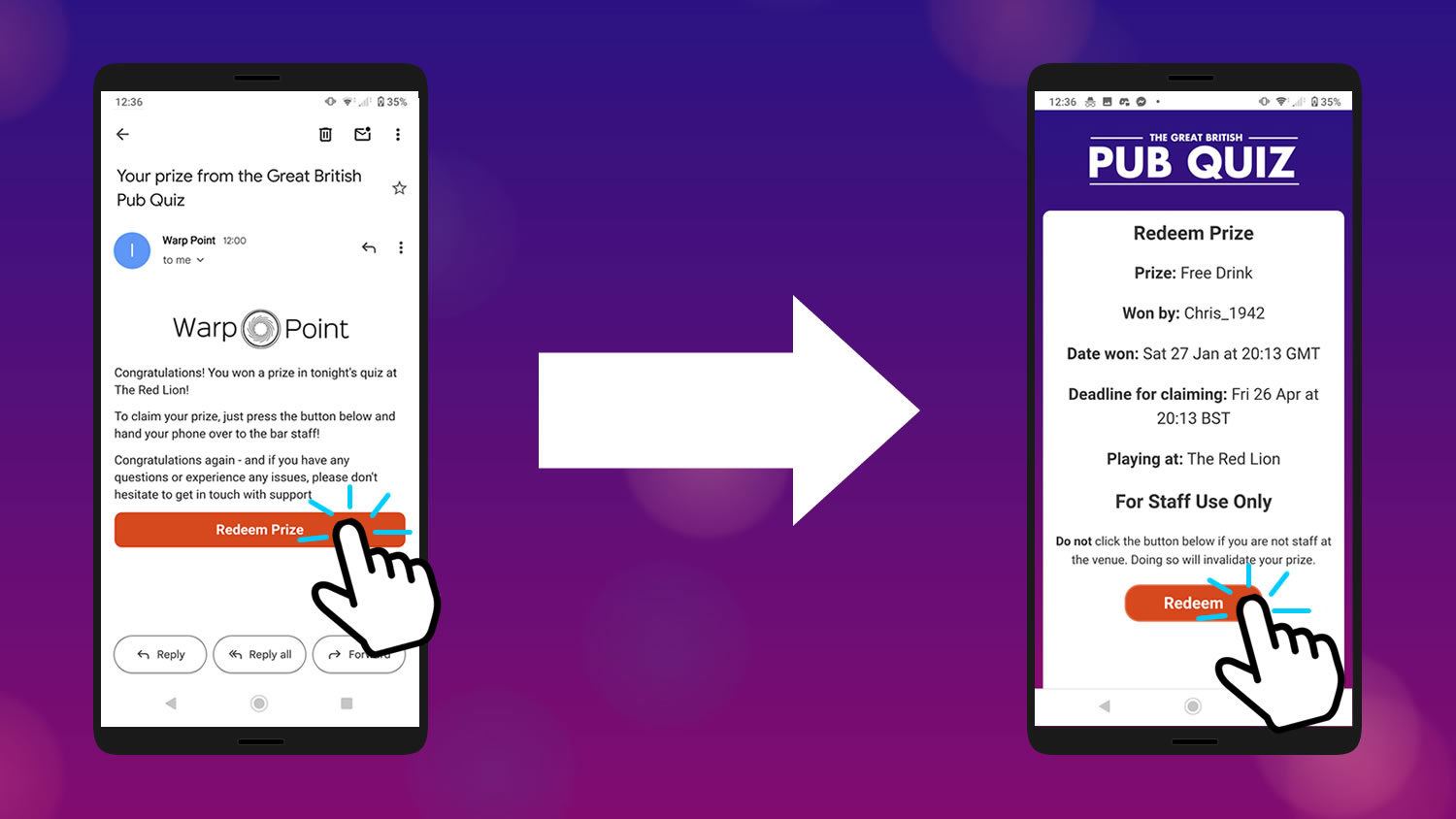
- When someone wins a prize, we send them an email. When they want to redeem it, they pull up the email on their phone, press "Redeem Prize" and hand it over to a member of staff in your venue.
- The page will show all the details about the player who won the prize. Your staff check everything looks in order, press "Redeem" and fulfil their prize.
This lets everyone keep track of which prizes have been redeemed automatically, reducing admin and making the whole process completely hassle free.
As stated in our terms and conditions, your venue is free to put any reasonable limitations on these prizes that you want. You can say a free drink voucher only applies to drinks under a certain amount, or that a bar tab can only be spent against food etc. It's entirely up to you - all you need to do is make sure players are aware of what they can and can't use their prize for when they try to redeem it.
The prizes do have an expiry date. For the cash prize, the player must generate their payout link within 30 days, and then claim their money within 7 days of generating their payout link. For everything else, they have 30 days to cash in their prize email for the house prize.
More information can be found in our venue terms and conditions
Players
Like a traditional pub quiz, players play the quiz in teams - but unlike other quizzes, here each team member plays along using their own phone: one device per person, not one device per team. This means when a team isn't sure, they can hedge their bets and split their answers however they see fit - so long as some get the answer right, they'll get some points.
There's no limit on the amount of players in total, the amount of players per team, or the amount of players per pub.
Each player pays a small fee to join in with the quiz via their phone, currently £2.50, with a portion going into the national prize pot for the evening.
Everything the player needs to play the quiz can be found right on their phone, so there's no need to worry about making sure everyone has a direct line-of-sight to the TV. If your pub's full of awkward nooks and crannies, it'll be fine, as all the questions, answers, pictures, and both national and venue-specific leaderboards are in the palm of their hands! All they need is to be able to get this week's venue code from the TV (to confirm they're actually in the pub they say they are), and they'll be good to go.
Internet
We know a lot of pubs don't have the world's best internet connections, and so the quiz has been designed to suit, with lots of clever little tricks to let us adapt to even the slowest of internet connections. We're confident the quality of your internet connection will not be an issue. Over the course of an entire quiz, each player will use mere kilobytes of data - something even the slowest of internet connection can handle with ease - and although questions are speed based, players are at no inherent disadvantage being on a slow connection.
If you have any questions, please do feel free to give us a shout - we run regular demo quizzes to bring new venues onboard, and we'd love to have you along for one to give you a chance to have a test run in your pub!